
Show the button when you keep selling out-of-stock products
When a product is set to Continue selling when out of stock, Shopify keeps showing the Add to cart button instead of Sold out, so the Notify me button doesn't appear. One option in the app embed brings it back.

Turn on the option
-
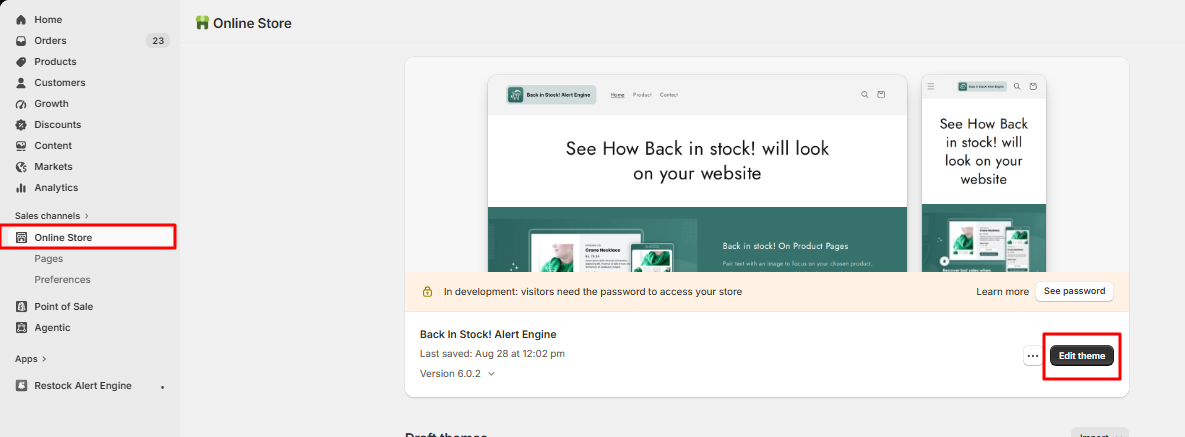
In your Shopify admin, go to Online Store and click Edit theme next to your current theme.
-
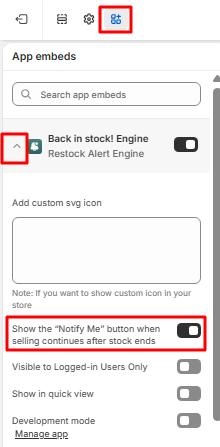
Click the App embeds icon in the left bar, then open the settings of Back in stock! Engine with the arrow next to it.
-
Turn on Show the "Notify Me" button when selling continues after stock ends, then click Save.
Check that it works: open a product that is out of stock but still for sale. The Notify me button now shows.